PixelPlanet
Convert, edit and create PDF Documents
PDF to Word, Excel and other formatsOrder PdfGrabber onlineDownload PdfGrabber Trial-version
Versions
Index
Functions
System requirements
Examples
Screenshots
License models
References
Support
Download
Order
 
Newsletter subscription:


PdfGrabber (Abbildung ähnlich)
New Version: PdfGrabber 6.0
Download Trial VersionConvert, edit and create PDFs

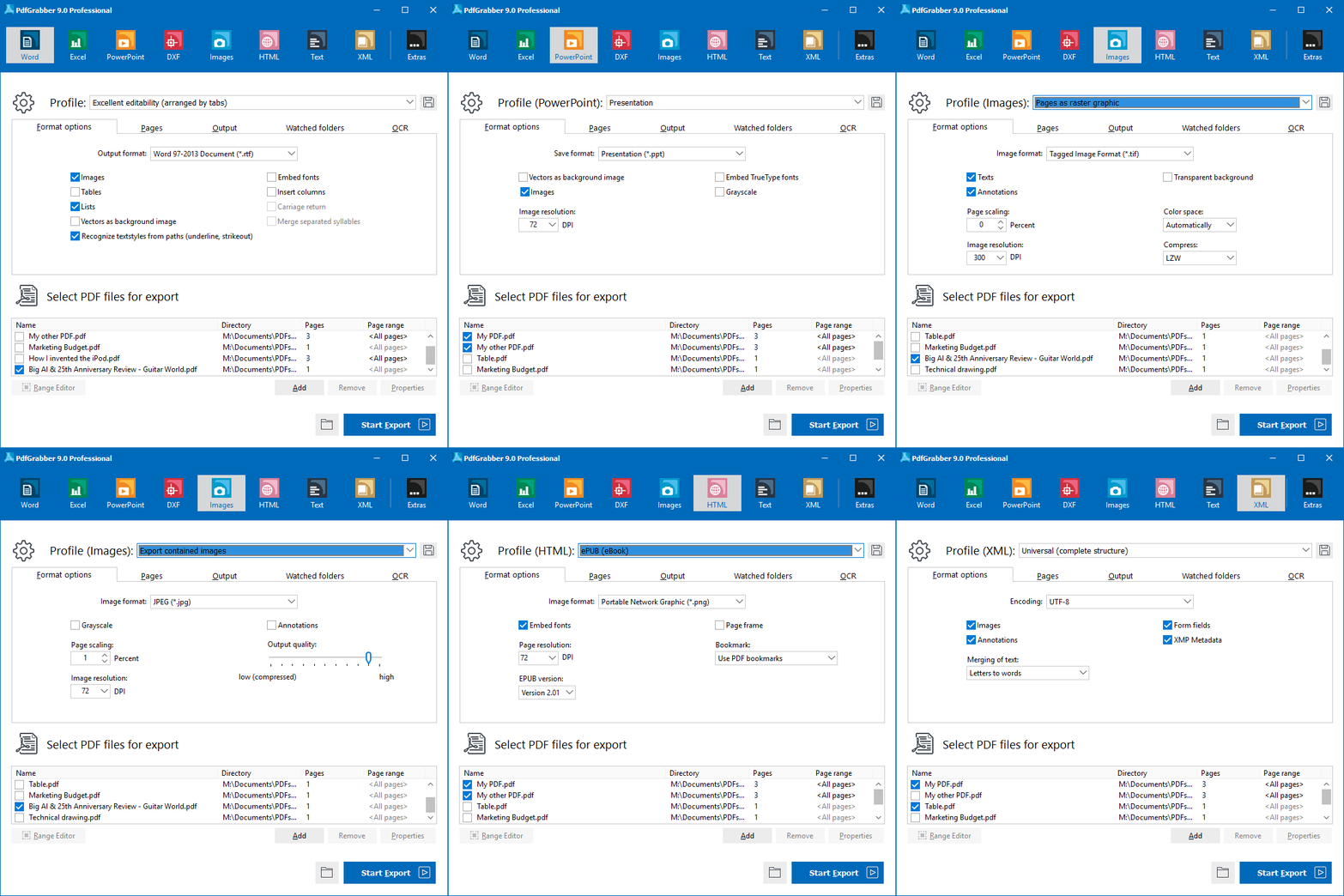
PdfGrabber makes it possible to export from PDF documents into various formats, e.g. PDF to Excel, PDF to RTF/Word, PDF to DXF/CAD, PDF to XML, PDF to PowerPoint, PDF to text or PDF to HTML.

Thus, PdfGrabber allows the editing and further processing of PDF content (text, images, vectors) in other applications, e.g. Microsoft Word®, Microsoft Excel®, Microsoft PowerPoint® or AutoCAD®, without Adobe Acrobat having to be installed.

PDF Im- und Export in verschiedene Formate: Word, Excel, Ascii, CAD, XML, Powerpoint, Bilder

Besides full support of Office 2007 and Windows 7, PdfGrabber also offers the ability to define export content by means of a frame (PdfGrabber Standard version and above). Frames can be dragged over the designated positions in the PDF document by means of a convenient editor. Only the content within these frames is then included in the export.


PdfGrabber 5.0 supports rotated text in Excel output and generates real curves in DXF output. It is also possible to export images. Not only can users of XML output enjoy being able to export pictorial information, but image output has been enhanced to enable the creation of image files, which are ideal for archiving purposes.

Furthermore, PdfGrabber also provides a PDF printer, with which exported documents can be reconverted to PDF. This means that you can export the relevant PDFs, make the necessary changes, then save the file once more as a PDF. It is possible to create PDF documents from any Windows application via a printer driver. The user also has the option of converting any document into a PDF file directly from Windows Explorer. Simply click on any document with the right mouse button and select the function 'Create PDF' in the context menu, or else use the linked application's print function and your document will be converted into a PDF.

How to print to PDF (PDF-Export)

PdfGrabber impresses with its ease of use and extensive features. It is available in three different versions:

 PdfGrabber 6.0 Home

Order OnlineEntry-level version with limited range of features for private users.

Output formats: Word / RTFASCII / TXTCreate PDF Documents from any printable application


Functions | Order | Trial version


 PdfGrabber 6.0 Standard

Order onlineEntry-level solution for private users and small businesses. The Standard version meets most PDF export requirements (see feature list). In addition to the features of the Home version, it also offers export to Microsoft Excel®, enables export of individual images within the content, as well as export of the entire page as an image and includes an editor, with which export areas can be defined. Furthermore, it enables PDF creation from any printable application.

Output formats: Word / RTFExcel (XLS)ASCII / TXTImagesPDF to HTMLCreate PDF Documents from any printable application


Functions | Order | Trial version


 PdfGrabber 6.0 Professional

Order online This version is geared toward professional users who have to export PDF files frequently. The additional features offered by this version include the output formats DXF/AutoCAD (with PDF layer support), PowerPoint and XML, the ability to export several PDF files simultaneously and the option of remote control via the command line or 'Monitored Folder' function. Additional functions offered only by the Professional version can be found in our feature list.


Output formats: PDF to Word / RTFPDF to Excel (XLS)PDF to ASCII / TXTPDF to ImagePDF to CAD / DXFPDF to XMLPDF to PowerPointPDF 2 HTMLCreate PDF Documents from any printable application


Functions | Order | Trial version


 PdfGrabber + PdfCrypter Professional bundle offer


Order onlineExport and edit PDF files with PdfGrabber, save them once more in PDF format, then use PdfCrypter to encrypt and secure them for distribution!

Buy PdfGrabber 6.0 and PdfCrypter 1.0 Professional in the low-cost bundle and save 29.- EUR


Additional Information | Order

 PdfGrabber 6.0 Professional Network Licenses

Order onlinePdfGrabber Professional network licenses allow simultaneous export of PDF content for multiple users in a network (LAN). Various license models can be selected, depending on the requirements.

License Models | Order | Trial version
© Copyright 1996-2010 PixelPlanet Contact | Press | Disclaimer | Imprint